Sunday, September 13, 2020

PHP Unix Socket under Windows

It's been a while that Windows 10 have support of Unix Domain Socket/UDS (although with limitation but that doesn't matter for this blog). While PHP language has some questionable design decisions, let me tell you something.

PHP already prepared for AF_UNIX support in Windows older than you think.

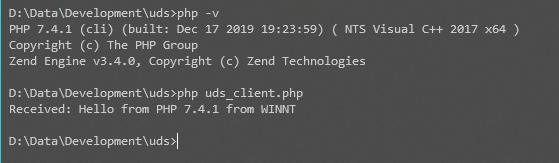
Checking the PHP source code, the earliest presence of sockaddr_un struct in the code existed since PHP 4.1.0. First let's test whetever UDS is supported in PHP 7.4. The server code

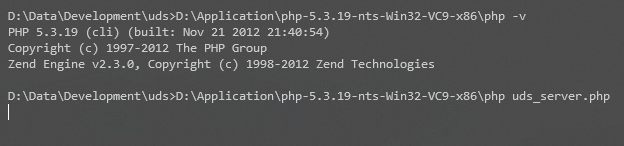
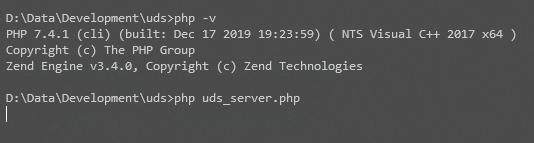
In my machine, that code runs (no error message)


So, the client code:

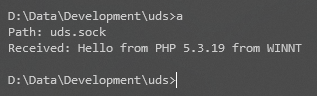
Running the client code prints the following message.

That means UDS is working. "Wait, that's probably PHP completely emulating UDS in Windows", fine, let's write the client code with C instead!

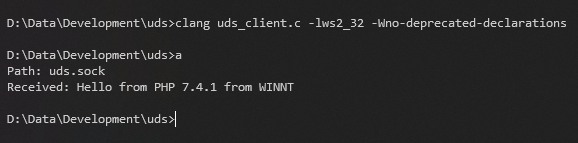
Compiling that code and running it shows this output.


That also means PHP didn't emulate UDS and uses WinSock directly.

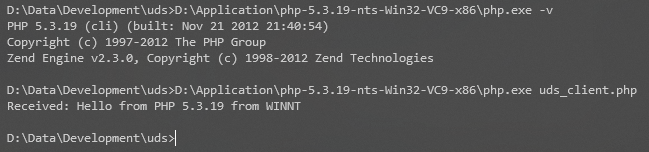
So, UDS works in PHP 7.4.1 under Windows. What about earlier version? It should be, right? Since reference to UDS in Windows existed since PHP 4.1.0. So let's try with PHP 5.3.19.

Note: The reason I choose PHP 5.3.19 because I didn't look at older commits that reference sockaddr_un in Windows, and I just see that it's there since 4.1.0 while writing this blog, after doing all testing.


The reverse is also possible, i.e. PHP 7.4.1 connecting to UDS which was created for PHP 5.3.19 and vice versa, but that will clutter this blog post with images.

This is surprising discovery in my opinion. What if PHP team already predicted this blog post after all? Well ...

That's story for another blog post.


Friday, August 14, 2020

Girls Band Party! PICO ~Extra Large~ Episode 15 Bodyswap Explained

Before you read the rest of the post, please watch the video.

Okay based on that video, we can see that all members of Roselia is switching bodies to each other in a game called Neo Fantasy Online, as they said in the end. This blog post will explain who swap to which one using only subtitle and visual hints.
  1. Duration 0:41, it's very unusual to see Yukina have that kind of expression. Furthermore, at 0:49,  Yukina calls Lisa "Rin-rin" for some reason. From this, we can conclude that Ako plays as Yukina. This is proven at 2:16 where Ako plays and seeing Yukina's body.
  2. At duration 1:28, it's absolutely unusual to see Ako with that expression. Her eye shape somewhat resemble Yukina. Also she wants to throw a rare item (implied by Yukina "NO" response). This means, Yukina plays as Ako.
  3. 0:53, Lisa asks Sayo to take action, but Rinko response instead. This means Sayo plays as Rinko.
  4. Same duration, 0:53, if you look closely to Sayo's expression, she tries to mimic Lisa's cat mouth. Also at 1:08, Sayo's behavior is somewhat absurd, which means Lisa plas as Sayo.
  5. This will be self-explanatory From all 4 points above, Rinko plays as Lisa. This is more proven at 1:00 when Lisa sorry to Rinko.

If you still not understand, see this table.

Player Yukina Sayo Lisa Ako Rinko
Character Ako Rin-rin Sayo Yukina Lisa

If you notice, this is similar to my previous, but older blog post about body swap which you can read here.

Also while playing RPG, make sure to manage your inventory frequently before it's too late. Otherwise

... your inventory may be full when you jsut found a rare herb, and it's hard to manage your inventory at that point.

Sunday, May 17, 2020

FL Studio and FFmpeg Libraries

Did you know that under the hood, FL Studio uses FFmpeg for some of their operations? For example, the Fruity Video Player plugin uses FFmpeg to load wide array of video codecs. And ZGameEditor Visualizer export function uses FFmpeg libraries for its video encoding.

Is this good or bad? Both. It's good because FFmpeg is the mother of codecs and formats, so it can decode lots of audio and video formats. But it's bad because FL Studio's bundled FFmpeg libraries are LGPL which lack some video encoder like x264. This causes problem where ZGameEditor Visualizer plugin lossy encoding option exports to H263 when using .mkv.

Note: ZGameEditor Visualizer seems always export to PNG in MP4 if you choose MP4 regardless of the "Uncompressed video" option.

So is it possible to change the old H263 to H264? Yes. LGPL software must be dynamically linked so it's user-replaceable, and fortunate for us, FL Studio dynamically links to FFmpeg. So how to replace the libraries? Just follow the steps below. Note that I assume 64-bit version of Windows and you're using 64-bit version of FL Studio executable.
  1. Make sure FL Studio is not running.
  2. Download 64-bit Windows FFmpeg shared binaries (release essential or release full). If you already have it downloaded before, you can use that. Just make sure it's latest version.
  3. Navigate to "%ProgramFiles(x86)%\Image-Line\Shared\ffmpeg\x64" and replace all the DLLs (except ILVideo_x64.dll) with the DLLs from the downloaded zip. Just the DLLs, not the exes too. It's good idea to backup all the DLL files there, just in case.

UPDATE: If you come here before, you'll notice I changed the link. This is because Zeranoe no longer provides FFmpeg binaries.

 Now start the FL Studio again, export to .mkv and it will use H264 (x264).

So what about other video codecs? Unfortunately FL Studio specialize MP4 extension and forces PNG in MP4 when used. But from my experiment, here are list of possible extension to use and the resulting video codec:

  • .mkv - H264 video codec (high profile) and Vorbis audio codec
  • .webm - VP9 video codec and Opus audio codec
  • .ogv - Theora video codec and Vorbis audio codec
  • .nut - MPEG4 video codec and AAC audio codec
Any other benefits of replacing the DLLs? Not sure if this another feature is caused by replacing DLL, but you can basically load any audio as long as the extension is one of FL Studio can recognize. Sadly that means you have to change the extension to .wav, .flac, .wv, .ogg, or .mp3 first before loading it to FL Studio.

I just hope the ZGameEditor Visualizer export function has more option of controlling the video output when using custom presets. I'd love that.

Thursday, May 14, 2020

Container vs. Codec

Often people misinterpret container as video format. Here's one simple scenario.

Say, there's A who have very old phone, released in 2007, and B who have smartphone released in 2019.
A: Can you send me that MP4 video in your smartphone
B: Sure.
A: Why it doesn't play in my phone? The phone says it supports MP4 video format but it can't play your video. Your video is bad and so do you.

So let's make this clear. First of all there are no such thing as "MP4 video format". Keep your questions for later. In the world of multimedia files such as video and audio, you have to know 3 things:
  1. Container file
  2. Audio codec
  3. Video codec
Container is a file that stores information how the video and the audio are stored inside the file. Sometimes also subtitles and additional files. Container also has information about what decoder should be used to decode the video and the audio and also contains when those video and audio should be decoded and presented to user. Here are some popular container file:
  1. MP4. Yes MP4 is a container, not a video format. Now you know!
  2. WebM.
  3. Matroska. Also known as MKV. The mother of container as it supports almost every codec in existence.
So, if MP4 is not video format, what are actually video formats? That's what called video codecs. It represents the data about how the video are encoded, basically video codec is what important about compatibility. Even if, say I use MP4 which was supported in A's phone above, but I use more recent codec, then A's phone won't able to play the video, despite being MP4.

So what are kinds of video codecs?
  1. MPEG4, XviD/DivX family goes here. A very old codec.
  2. H264, most popular codecs since smartphone existed.
  3. H265, recent codec which provides smaller size and better quality.
  4. VP9, royalty-free codec by Google which compete with H264.
  5. AV1, royalty-free codec various vendors which compete with H265.
PS: "royalty-free" term doesn't mean anything from user perspective. It only matters from developer perspective.

For scenario above, if B's video contains H265 codec, then A's phone won't able to play it, even if the video itself is inside MP4 container file. Now everything makes sense, right?

Then there's also audio codec. Watching silent video is not very fun right? Then here comes the audio codec. The definition is same as video codec above, but for audio instead. There's only one difference, most audio codecs can be extracted out of their container, being standalone file. That's not possible for video codec.

So, list of audio codec please? Okay.
  1. AAC. Its standalone file extension is .aac (actually MPEG ADTS). Can be placed inside MP4 container.
  2. Opus. Must be placed in Ogg or WebM container.
  3. Vorbis. Must be placed in Ogg container.
  4. FLAC. Its standalone file extension is .flac. Can be placed inside Ogg container.
  5. MP3. Its standalone file extension is .mp3. Can be placed inside MP4 container.
Whoa, hang on, so Ogg is not an audio format? Yes. Ogg is also a container. It can contain Theora video codec.

So the conclusion is, if the video file is in extension that you know, that doesn't guarantee your device can play it. Like, you feel your device is superior because it can decode AV1 in MP4 until FL Studio's ZGameEditor Visualizer lossless video export function writes PNG image inside MP4.
Sunday, January 12, 2020

Know Your Lua Errors

One problem when trying to help people with their Lua problem is that they don't know how to read Lua errors. You can be 100% sure that saying "it doesn't work" is absolutely not helpful at all. So I'll tell you the ways to read Lua errors properly and what it means.

In this post, I used "<>" symbol to denote something arbitrary. Start by reading the syntax of Lua error. Lua error is usually have syntax like this:

<filename>:<lineNumber>: <message>

<filename> is the script file. <lineNumber> is line number where it occured. That's very easy to remember, right? Now for the error message. The error message is usually very descriptive but sometimes it doesn't really tell you what exactly is wrong, so here are some lists of Lua errors that I'm aware of. If your Lua error is unlisted, that can mean I didn't add it yet or it's thrown by external program.
  1. attempt to call global '<name>' (a <non-function> value)
    This caused when you're trying to call a global variable called '<name>' but '<name>' is not a function type. Example
    print() -- works
    table() -- attempt to call global 'table' (a table value)
    _VERSION() -- attempt to call global '_VERSION' (a string value)
    anilvalue() -- attempt to call global 'anilvalue' (a nil value)
    
  2. attempt to call field '<field>' (a <non-function> value)
    Similar to above, but this occurs when you try to call something within a table.
    -- Note that 'math' is a global variable which is table
    math.abs(123) -- works
    math.pi() -- attempt to call field 'pi' (a number value)
    
  3. bad argument #<n> to '<name>' (<type1> expected, got <type2>)
    This is caused when a function '<name>' expects value with type <type1> for n-th argument, but user passed something with type <type2> instead.
    -- io.open expects string for the 1st argument
    local file = io.open(io.open) -- bad argument #1 to 'open' (string expected, got function)
    -- tonumber 2nd argument expects number if present
    tonumber("0xFF") -- works
    tonumber("0xFF", table) -- bad argument #2 to 'tonumber' (number expected, got table)
    
  4. table index is nil
    To be honest, this is most undescriptive Lua error message. What it means that you try to assign a value to a table at index "nil" (I mean literal nil).
    table[nil] = io -- table index is nil
    
  5. bad argument #<n> to '<name>' (invalid option '<something>')
    This means you passed invalid option. Notable function that throw this is 'collectgarbage' and 'file:seek'.
    print(collectgarbage("count")) -- works
    collectgarbage("asd") -- bad argument #1 to 'collectgarbage' (invalid option 'asd')
    
So I think that covers most common Lua errors that you mostly encounter. In case you need help, please provide the Lua error message, plus the traceback if available. The traceback is also easy to read, the syntax is similar to above, and it definely helps.

... unless you got a very rare "PANIC" error which is unhelpful. No, really.