Thursday, November 19, 2020

LÖVE on Windows 10 ARM64 Part 2: One Step at A Time


OpenAL-soft test program I wrote running in Windows 10 ARM64 under QEMU

So I have few news that I want to share. First, OpenAL-soft now complies for Windows 10 ARM64. LÖVE depends on OpenAL for high performance audio backend (even the -soft version of OpenAL developed by kcat is fast enough), so getting this compiles for Windows 10 ARM64 means one step forward to bring LÖVE on Windows 10 ARM64. And the last is Microsoft released OpenGL driver built on-top of Direct3D 12 for Windows 10 ARM. This probably sounds that my effort of making weekly binaries of ANGLE using GitHub Actions is useless but actually no. Compiling ANGLE is bit data-intensive so people will just prefer getting binaries.

Since I've successfully able to run Windows 10 ARM64 under QEMU, this blog post will wrote about it.

The first thing that comes to my mind when installing this is picking good tutorials. I found this tutorial (click here) is good as it provides all the necessary drivers, firmware, and EFIvars needed, although I have to source the .iso myself, but I already did that beforehand.

As the tutorial said, it's slow as dirt at i7-4770K, so it's safe to assume that it's even slower than dirt at my laptop, i5-7200U (okay it has dGPU but it's irrelevant for this). I had to do the setup multiple times with multiple strategies just to make it get past OOBE and I think I killed around 120GB worth of SSD writes because this.

My first method is basically naive method. Automatic graphic installer, then proceed as Microsoft intended. This doesn't go well because I can't get past OOBE and then it just automatically restart then stuck in restart loop (which forces me to redo the install again). I retried this multiple times with different CPU (from 2 to 4 CPU) and RAM (from 2 to 4GB) configuration with no avail, so my conclusion is I need to look for other methods.

Because my problem is related to OOBE, it makes me wonder if I can somehow skipped it. I don't quite remember the whole progress of this, but what I remember is I installed Windows 10 kinda "manually". I searched on YouTube about Windows 10 hacks by Enderman and found an interesting video of installing Windows 10. Basically instead of installing via GUI, just install it from command prompt.

First time I tried the method, it result in unbootable OS (blue screen with INACCESSIBLE_BOOT_DEVICE). That's because the "manual" install method assume no additional drivers needed to detect the disk. Unfortunately in my case, I need to add RedHat VirtIO driver prior installing so it can detect the disk (see tutorial link above at step 9). Well even when I installed the drivers manually via DISM, it still result in endless boot loading icon, so I erased the whole install again.

Finally, the method I found to be working is this. First, install the Windows 10 as usual (from the ISO). After the first-phase install finished, I boot back to the setup ISO then open command prompt there (Shift+F10). At this command prompt, I installed the RedHat VirtIO with "pnputil" command, then mount the partition back with diskpart. Afterwards, I just follow along the YouTube video above starting at 0:56 (no need to type the bcdboot command!). For the last part, when the video says wait for 5 minutes, I actually waited for hours. First attempt of this failed so had to redo again, but then I found it works when I simply "reset" the emulator just when it shows the login screen.

Afterwards, jsut tick the privacy thingy then you're ready to use it. You need to alter the registry again to kill OneDrive setup tho because running x86-emulated binaries there is too slow to the point that installing VS2019 redistributable is impossible because no window pops up (let alone OneDrive setup). For additional performance, this tips (click here) really helps alot on making sure the CPU stays idle and not spin at 100% continously.

That's how I got Windows 10 ARM64 running under QEMU in my laptop. And of course I'll continue this blog post when I have progress.

... and if you want to read the previous blog post, please click here.

Monday, November 16, 2020

LÖVE on Windows 10 ARM64 Part 1: Compiling Dependencies

ARM64 laptops probably start getting its hand on like 2021 or 2022 (wild guess). As one of LÖVE development team, this makes me wonder if I can run LÖVE under Windows 10 ARM64, natively, because using x86 emulation is cheating and doesn't work anyway due to LÖVE dependency to OpenGL.

First thing I have to think is:

  1. Get Windows 10 ARM64 toolchain. This is easy. Visual Studio Installer provide this.
  2. Get QEMU.
  3. Get Windows 10 ARM64 image.

Fact: I have to go to my friend house and ask to use his WiFi to download those because I'm poor.

Quick testing the ARM64 toolchain by compiling my infamous HonokaMiku with CMake shows the ARM64 cross compiler works. Now before compiling LÖVE, these things comes to mind prior trying to compile it:

  1. LuaJIT doesn't support Windows/ARM64 combination.
  2. OpenGL is not supported. 

Point 1 is kinda bummer because even LuaJIT interpreter is waaaayyy faster than Lua 5.1.5, but I have no choice other than adding -DLOVE_JIT=0 CMake flags later on. Point 2 can be solved by using ANGLE. I have to "brute-force" GitHub Actions to get ANGLE compiled for ARM64, but this pays off and the actions build script can be extended to other architecture later as well.

When trying to compiling it, unfortunately SDL, PhysFS, Vorbis, and OpenAL-soft fails to compile. I've filled issue tracker for OpenAL-soft but SDL (and others) probably needs to wait longer as I also need to attend online classes (univ related), thus slowing down this experiment as whole. Known libs to compile are FreeType, GLSLang, zlib, and Ogg. Others are unknown as MSBuild prevents me compiling other dependencies.

For the VM part, I haven't getting myself a way to pass OOBE in Windows 10 ARM64 running under QEMU. Mind you, it's slower than dirt in i5-7200U. Blogpost about setting up the VM need to wait.

Also this is me trying to get LÖVE compile with Windows 10 ARM64 toolchain:

Lumine is underrated.

Sunday, September 13, 2020

PHP Unix Socket under Windows

It's been a while that Windows 10 have support of Unix Domain Socket/UDS (although with limitation but that doesn't matter for this blog). While PHP language has some questionable design decisions, let me tell you something.

PHP already prepared for AF_UNIX support in Windows older than you think.

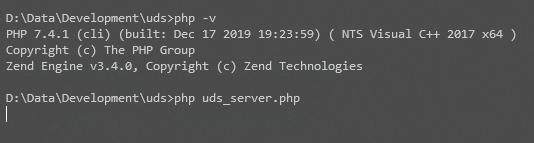
Checking the PHP source code, the earliest presence of sockaddr_un struct in the code existed since PHP 4.1.0. First let's test whetever UDS is supported in PHP 7.4. The server code

In my machine, that code runs (no error message)


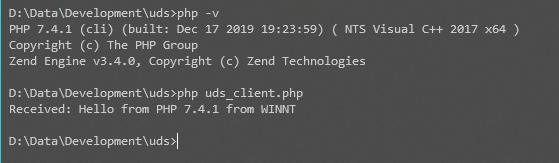
So, the client code:

Running the client code prints the following message.

That means UDS is working. "Wait, that's probably PHP completely emulating UDS in Windows", fine, let's write the client code with C instead!

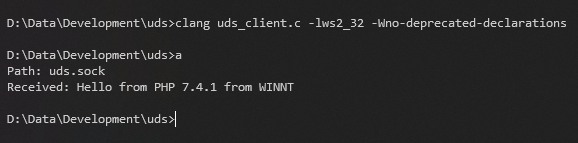
Compiling that code and running it shows this output.


That also means PHP didn't emulate UDS and uses WinSock directly.

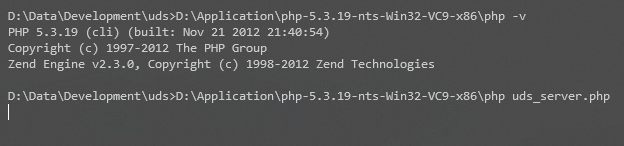
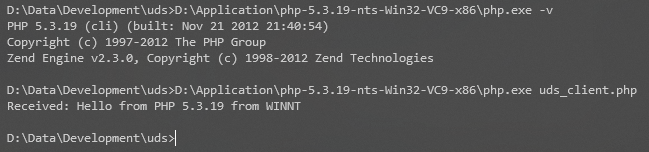
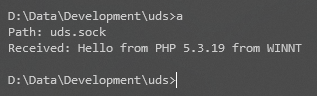
So, UDS works in PHP 7.4.1 under Windows. What about earlier version? It should be, right? Since reference to UDS in Windows existed since PHP 4.1.0. So let's try with PHP 5.3.19.

Note: The reason I choose PHP 5.3.19 because I didn't look at older commits that reference sockaddr_un in Windows, and I just see that it's there since 4.1.0 while writing this blog, after doing all testing.


The reverse is also possible, i.e. PHP 7.4.1 connecting to UDS which was created for PHP 5.3.19 and vice versa, but that will clutter this blog post with images.

This is surprising discovery in my opinion. What if PHP team already predicted this blog post after all? Well ...

That's story for another blog post.


Friday, August 14, 2020

Girls Band Party! PICO ~Extra Large~ Episode 15 Bodyswap Explained

Before you read the rest of the post, please watch the video.

Okay based on that video, we can see that all members of Roselia is switching bodies to each other in a game called Neo Fantasy Online, as they said in the end. This blog post will explain who swap to which one using only subtitle and visual hints.
  1. Duration 0:41, it's very unusual to see Yukina have that kind of expression. Furthermore, at 0:49,  Yukina calls Lisa "Rin-rin" for some reason. From this, we can conclude that Ako plays as Yukina. This is proven at 2:16 where Ako plays and seeing Yukina's body.
  2. At duration 1:28, it's absolutely unusual to see Ako with that expression. Her eye shape somewhat resemble Yukina. Also she wants to throw a rare item (implied by Yukina "NO" response). This means, Yukina plays as Ako.
  3. 0:53, Lisa asks Sayo to take action, but Rinko response instead. This means Sayo plays as Rinko.
  4. Same duration, 0:53, if you look closely to Sayo's expression, she tries to mimic Lisa's cat mouth. Also at 1:08, Sayo's behavior is somewhat absurd, which means Lisa plas as Sayo.
  5. This will be self-explanatory From all 4 points above, Rinko plays as Lisa. This is more proven at 1:00 when Lisa sorry to Rinko.

If you still not understand, see this table.

Player Yukina Sayo Lisa Ako Rinko
Character Ako Rin-rin Sayo Yukina Lisa

If you notice, this is similar to my previous, but older blog post about body swap which you can read here.

Also while playing RPG, make sure to manage your inventory frequently before it's too late. Otherwise

... your inventory may be full when you jsut found a rare herb, and it's hard to manage your inventory at that point.

Sunday, May 17, 2020

FL Studio and FFmpeg Libraries

Did you know that under the hood, FL Studio uses FFmpeg for some of their operations? For example, the Fruity Video Player plugin uses FFmpeg to load wide array of video codecs. And ZGameEditor Visualizer export function uses FFmpeg libraries for its video encoding.

Is this good or bad? Both. It's good because FFmpeg is the mother of codecs and formats, so it can decode lots of audio and video formats. But it's bad because FL Studio's bundled FFmpeg libraries are LGPL which lack some video encoder like x264. This causes problem where ZGameEditor Visualizer plugin lossy encoding option exports to H263 when using .mkv.

Note: ZGameEditor Visualizer seems always export to PNG in MP4 if you choose MP4 regardless of the "Uncompressed video" option.

So is it possible to change the old H263 to H264? Yes. LGPL software must be dynamically linked so it's user-replaceable, and fortunate for us, FL Studio dynamically links to FFmpeg. So how to replace the libraries? Just follow the steps below. Note that I assume 64-bit version of Windows and you're using 64-bit version of FL Studio executable.
  1. Make sure FL Studio is not running.
  2. Download 64-bit Windows FFmpeg shared binaries (release essential or release full). If you already have it downloaded before, you can use that. Just make sure it's latest version.
  3. Navigate to "%ProgramFiles(x86)%\Image-Line\Shared\ffmpeg\x64" and replace all the DLLs (except ILVideo_x64.dll) with the DLLs from the downloaded zip. Just the DLLs, not the exes too. It's good idea to backup all the DLL files there, just in case.

UPDATE: If you come here before, you'll notice I changed the link. This is because Zeranoe no longer provides FFmpeg binaries.

 Now start the FL Studio again, export to .mkv and it will use H264 (x264).

So what about other video codecs? Unfortunately FL Studio specialize MP4 extension and forces PNG in MP4 when used. But from my experiment, here are list of possible extension to use and the resulting video codec:

  • .mkv - H264 video codec (high profile) and Vorbis audio codec
  • .webm - VP9 video codec and Opus audio codec
  • .ogv - Theora video codec and Vorbis audio codec
  • .nut - MPEG4 video codec and AAC audio codec
Any other benefits of replacing the DLLs? Not sure if this another feature is caused by replacing DLL, but you can basically load any audio as long as the extension is one of FL Studio can recognize. Sadly that means you have to change the extension to .wav, .flac, .wv, .ogg, or .mp3 first before loading it to FL Studio.

I just hope the ZGameEditor Visualizer export function has more option of controlling the video output when using custom presets. I'd love that.